iPhone front camera
A mirrored workout preview is the primary app surface.
Built for solo sets on iPhone
A privacy-first iPhone workout rep counter.
Prop up the iPhone and move. LoopCam uses the front camera and on-device pose detection to track supported reps hands-free, with local recording when a replay matters.
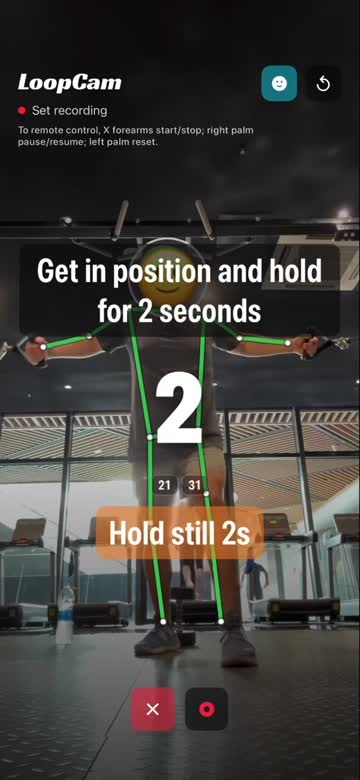
Real LoopCam app footage · iPhone front camera · no staged product UI
Why LoopCam
Keep your hands on the movement.
See the count without breaking focus.
Get a warning when the camera cannot be sure.
Camera first
LoopCam opens on the live camera surface. The count stays readable from workout distance while pose overlays, recording controls, and framing prompts remain close to the movement they explain.
One screen. One set.
Honest by design
When body visibility, lighting, confidence, or person count is not good enough, LoopCam shows a short warning instead of pretending the movement was clear.
Better framing before another count.
How it works
Use a stable stand, shelf, or tripod with one person clearly in frame.
The live camera surface keeps the count, warnings, and optional recording visible.
On-device pose detection feeds deterministic counters for supported movement cycles.
Review the count and save a local recording only when a replay is useful.
What is inside
LoopCam stays deliberately narrow: camera-based counting on iPhone, useful visual feedback, optional local evidence, and clear limits when the view is not good enough.
A mirrored workout preview is the primary app surface.
Vision pose extraction and counter logic run in the iOS app path.
Supported full movement cycles count without tapping the screen mid-set.
Recording is optional and stays local unless it is intentionally exported or shared.
Code and tests cover push-up, squat, deadlift, auto-reps, and unknown fallback paths.
LoopCam can refuse to count when visibility, confidence, or person count is wrong.
Private by default
Pose analysis is designed to happen in the app. No LoopCam cloud account is required for the current counter flow, and recordings stay local unless they are intentionally exported or shared.
Read the local-first workout tracking guideBuilt with real sets
Useful feedback is concrete: movement, reps performed, reps counted, phone placement, lighting, and whether LoopCam asked for better framing at the right time.
Questions, answered
The current product and codebase target iPhone with the front camera.
The current counter engine covers push-up, squat, deadlift, auto-reps, and unknown fallback paths. Real-world accuracy depends on framing and confidence.
Recordings are designed to stay local unless exported or shared. Support email is outside the app, so only send videos intentionally.
No. LoopCam counts supported reps and shows camera-quality warnings. It does not certify form, prevent injuries, or replace a coach.
No. LoopCam does not block apps, set Screen Time schedules, or unlock social apps after exercise.
No. LoopCam is a workout set counter, not an earned-scrolling product.
Read the Privacy Policy and Terms of Use.
One set starts here
Place the iPhone. Step into frame. Keep your attention on the movement.
Download on the App Store